
Recently I have just been fed up of listening to music in my browser and when I was looking for some alternatives by checking out some music players, none of them suited me. And so, I just thought why not use this as an excuse to just use bubbletea for the first time and just make a decent ui for mpv and use it.
And that's how we end up with my recent project, torch song
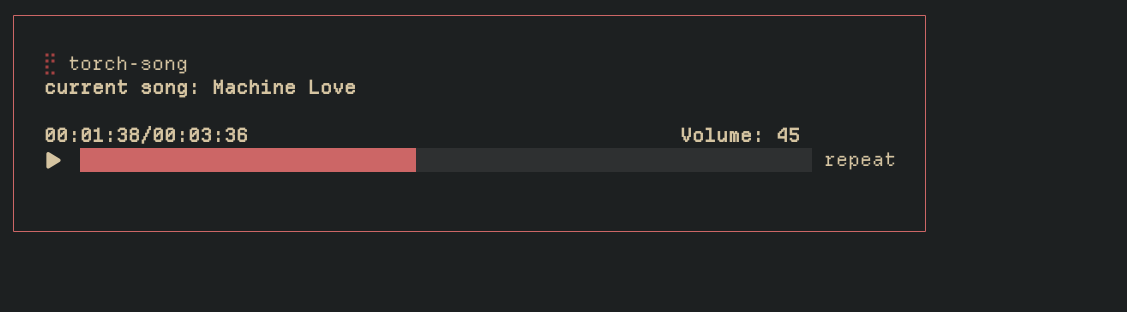
My goal was simple, I don't need a complicated ui, I just need the title, the time duration, a way to repeat a single song if I want to and make it look somewhat presentable while ensuring that I have an easy way to adjust keybinds as necessary. And another reason was also because I just wanted to make a pokemon reference, and so using one of my favorite pokemon's signature move as the name also counts as it I suppose. I also wanted a minimal ui, not because I like the aesthetic but I have no clue how to style.
Implementation
So anyways, working with bubbletea means you must either already know Elm Architecture or need to get familiar with it. Since this was my first time it was somewhat confusing at first but I got a hang of it easily. Elm architecture let's you breakdown interactive ui into three parts: Model, View, Update.
- Model: The state of your application
- View: a way to turn your state into HTML
- Update: a way to update your state based on messages
I didn't want to complicate things by adding submodels or anything extra and just get the simplest approach by making a main model which holds all the components I would like title, time position and etc. Along with the flags I would be using to keep some other features like repeat and all.
type model struct {
	mpv          *gompv.Client
	title        string
	timePos      string
	timePosFlag  float64
	paused       string
	repeat       bool
	repeatFlag   string
	playlistPos  int
	duration     string
	durationFlag float64
	spinner      spinner.Model
	progress     progress.Model
	data         map[string]any
}
The view part of the code is the ui which updates based on the keybinds which are in the update part, where each keybind has a specific function which changes the state and is then rendered by view.
Now in rust there is a crate which essentially makes incorporating mpv to your application a breeze, libmpv. But go doesn't have that and I got to that point after I realised that maybe just getting an mpv process started with an exec.Command isn't the brightest idea. But after some searching up I came across gompv which made my whole job so much easier.
All you need to do is initialise the client with start and connect and use multiple functions which does your job much simpler.
package main
import (
"fmt"
"log"
"github.com/ioksc/gompv"
)
func main() {
client, err := gompv.Connect("/tmp/mpv.sock")
if err != nil {
log.Fatalf("connect: %v", err)
}
defer client.Close()
}
The rest of the part was just reading through the provided documentation to see what all I can use to get it working in the way I need it to. Making a config file and using burntsushi/toml to parse and use it in my app. And then just trying to brainstorm my way through something I haven't even used once was a fun experience.
Conclusion
I wanted to try this project since I thought it was a good excuse to not only make something for myself but also just try out things I never used once and just figure out things along the way. It was also a short project since I was lucky finding packages which make my job simpler and so it was a fun experience to build this in around two weeks.
Currently there are some features I would like to add like a way to scrobble my music into a third party service and add discord rich presence and maybe a visualiser because it would look cool. But with where things are currently, I think I did do my job for making a decent looking music player I can use and that does truly cater to me.